



How to Set Up a WhatsApp Shared Team Inbox for Your Shopify Store
Customer Support Published: July 16, 2026
For Shopify stores managing customer support through a single WhatsApp account, the breaking point usually arrives quietly. A conversation gets missed because one agent thought another had replied. Response times start slipping because one phone can’t keep up with the volume. A customer messages three times in two hours and hears nothing back — and the fix for all three of those problems is a WhatsApp shared team inbox.
A shared team inbox replaces a single-device WhatsApp account with a web-based dashboard where your whole support team manages conversations from the same number simultaneously — with Shopify order data visible in every chat, conversation assignments clear to every agent, and nothing falling through the gaps between team members.
The strategic foundation for WhatsApp customer support — App vs API, WISMO handling, and automation frameworks — is covered in the WhatsApp customer support guide for Shopify. This post goes deep on the shared inbox specifically.
Quick Answer
A WhatsApp shared team inbox lets multiple agents manage customer conversations from the same WhatsApp Business number simultaneously — no more passing a phone around or missing messages because only one person has access. It requires the WhatsApp Business API and a connected Shopify app that surfaces order data inside each conversation. The right time to set one up is when you’re handling 20–30 conversations per day across more than one agent — before response times start slipping, not after.
Key Takeaways
- A shared inbox is not a feature of WhatsApp — it requires the WhatsApp Business API and a third-party platform that builds the team workspace on top of it
- The WhatsApp Business App has a 5-device limit and no conversation assignment — it’s not a shared inbox, it’s shared access to the same account
- The moment a second agent needs to reply to customers on the same WhatsApp number, you need a shared inbox — shared device access is not a scalable substitute
- Shopify order data visible inside each conversation is the most important functional difference between a generic shared inbox and a Shopify-native one
- Most Shopify stores set up a shared inbox after they’re already overwhelmed — the right trigger is 20–30 conversations per day feeling manageable, not impossible
What Is a WhatsApp Shared Team Inbox
A WhatsApp shared team inbox is a centralized workspace where multiple agents can manage customer conversations from one WhatsApp Business number. Using the WhatsApp Business API, it enables teams to collaborate, assign chats, monitor conversations, and respond to customers from a single shared dashboard instead of individual phones.
WhatsApp Support Without a Shared Inbox

Without a shared inbox, WhatsApp support on Shopify looks like one of three things — all with the same fundamental problem.
The most common version: one person manages all customer WhatsApp conversations from their phone. When that person is available, support is fast. When they’re unavailable — in a meeting, offline, out sick — conversations sit unanswered until they’re back.
The second version: the WhatsApp Business number is logged into on multiple devices using the multi-device feature. Two or three people can see the same conversations, but there’s no assignment — so every agent sees every message, nobody knows who’s replying to what, and the same customer sometimes gets two replies from two different people saying slightly different things.
The third version: a personal WhatsApp number is used for customer support, which means only one device, no business features, and a number that doesn’t transfer when the person leaves the team.
All three share the same root problem: there’s no structure around who owns which conversation. When something falls through the gaps, nobody knows it happened until a customer follows up — or doesn’t.
How WhatsApp Support Changes With a Shared Inbox
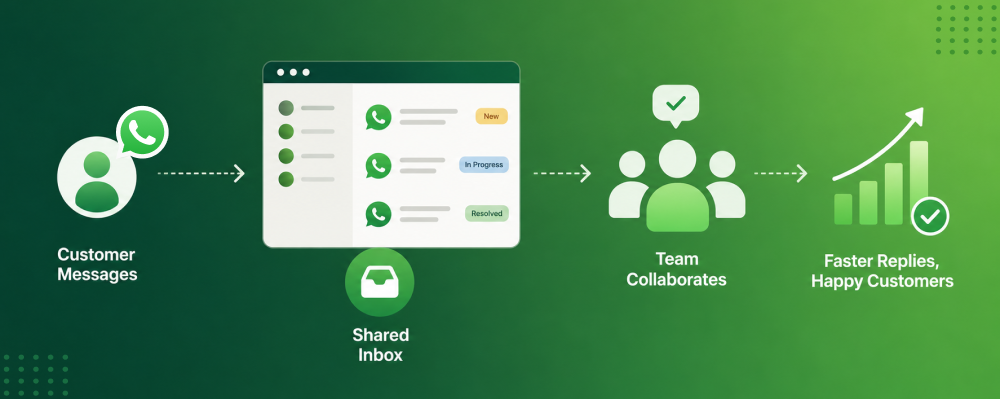
A shared team inbox creates structure around every conversation. When a customer messages your Shopify store on WhatsApp, the message appears in a shared dashboard that every agent on your team can access from their browser or desktop — not from the same phone, but each from their own screen simultaneously.
From that point, every conversation has a clear state: unassigned (new and waiting for an agent), assigned (one agent owns it and is working on it), or resolved (closed). Agents pick up conversations, reply, and close them — or reassign to a colleague when escalation is needed. Every agent sees only what they need to see, and the supervisor can see everything.
For Shopify merchants specifically, the most important change isn’t assignment or visibility — it’s the customer context that becomes available inside each conversation. A generic WhatsApp inbox shows the customer’s name and message history. A Shopify-native shared inbox shows the customer’s name, their last three orders, current order status, fulfilment details, and any previous support interactions — all visible before the agent types a single word.
Signs Your Shopify Store Needs a WhatsApp Shared Inbox
A WhatsApp shared inbox becomes essential as your Shopify business scales and customer conversations increase. If you notice any of the following challenges, it's likely time to move from a single-user setup to a collaborative inbox.
Signs You Have Outgrown a Single WhatsApp Account
Sign 1: Conversations are being missed and you find out from the customer.
A customer re-sends their message, or mentions in a new conversation that they messaged two days ago and heard nothing. The message arrived — it just wasn’t picked up because the person managing the account was busy with something else and nobody else had visibility.
Sign 2: First response time has started slipping past 2 hours during business hours.
This is the clearest operational signal. When one person is managing all conversations from a phone, volume eventually outpaces attention. The first thing that slips is first response time — and customers on WhatsApp feel that slip faster than on any other channel.
Sign 3: Two agents are sometimes replying to the same customer simultaneously.
This happens when multiple people have access to the same WhatsApp account but there’s no assignment system. The customer gets a duplicate or contradictory reply. The agents don’t realise until the customer points it out — if they point it out at all.
Sign 4: You can’t tell at a glance how many open conversations you have.
Without a structured inbox, there’s no way to know the current support backlog. You’re managing by scrolling, not by data — and that means you’re always reacting, never ahead of the volume.
When to Set Up a WhatsApp Shared Inbox for Shopify
The typical Shopify store sets up a shared inbox when they’re already overwhelmed — conversations are being missed daily, agents are stressed, and response times have been bad for weeks. Setting up a new platform while that’s happening costs more time and disruption than it would have cost to set it up two months earlier.
The reason most stores wait too long is that the problem builds gradually. One missed conversation doesn’t feel like a crisis. Two agents occasionally replying to the same customer feels like a minor coordination issue. A response time slipping from 1 hour to 3 hours feels like a temporary busy period. By the time it clearly is a crisis, the team is already running on reactive mode — which is the worst moment to implement and learn a new system.
The right trigger is 20–30 conversations per day across more than one agent. At that volume, the current setup still feels manageable — which is exactly when setting up a shared inbox is lowest-cost and highest-impact.
How a WhatsApp Shared Inbox Improves Customer Experience
A WhatsApp shared inbox improves customer experience by enabling your support team to respond quickly, collaborate seamlessly, and maintain consistent communication. This leads to faster resolutions, fewer missed messages, and higher customer satisfaction.
How a Shared Inbox Reduces WhatsApp Response Time
From the customer’s perspective, a shared inbox is invisible. They don’t know how many agents are managing their conversation or what tool is being used. What they experience is the outcome: how quickly someone replies, whether the reply is consistent with previous messages, and whether they ever have to repeat themselves.
The most immediate customer-facing change when a Shopify store moves to a shared inbox is response time. With multiple agents able to pick up conversations simultaneously — rather than one person working through a queue from a phone — first response times during business hours drop. Conversations that would have waited 2–3 hours for one overloaded agent to reach them now get picked up within minutes by whoever is available.
For Shopify customers, this change is felt most acutely during peak periods — sale events, festive seasons, new product launches — when message volume spikes and single-agent setups collapse under the pressure.
Shopify Order Data Inside Every WhatsApp Conversation
The functional difference between a generic WhatsApp shared inbox and a Shopify-native one comes down to one question: what does the agent see when a conversation opens?
In a generic shared inbox, the agent sees the customer’s message and their WhatsApp display name. To answer a question about an order, they open Shopify in a separate tab, search for the customer, find the order, copy the relevant details, and paste them into the reply.
In a Shopify-native shared inbox, the agent sees the customer’s message, their order history, the status of their current order, the fulfilment and tracking details, and any previous support interactions — before they start typing. The agent doesn’t need to open Shopify. The answer to “where is my order?” is already on the screen.
For the customer, this produces a specific experience: an agent who already knows their order situation without being told. That experience — of being recognised and not having to re-explain — is one of the highest-trust signals a support interaction can send.
Chatix connects the WhatsApp Business API directly to your Shopify store, surfacing order data, fulfilment status, and customer history inside every conversation in the shared inbox. For how the shared inbox connects to broader customer data and conversation history, the WhatsApp CRM guide covers how conversation logs feed into customer records.
How to Set Up a WhatsApp Shared Team Inbox for Shopify
WhatsApp Shared Inbox Requirements for Shopify
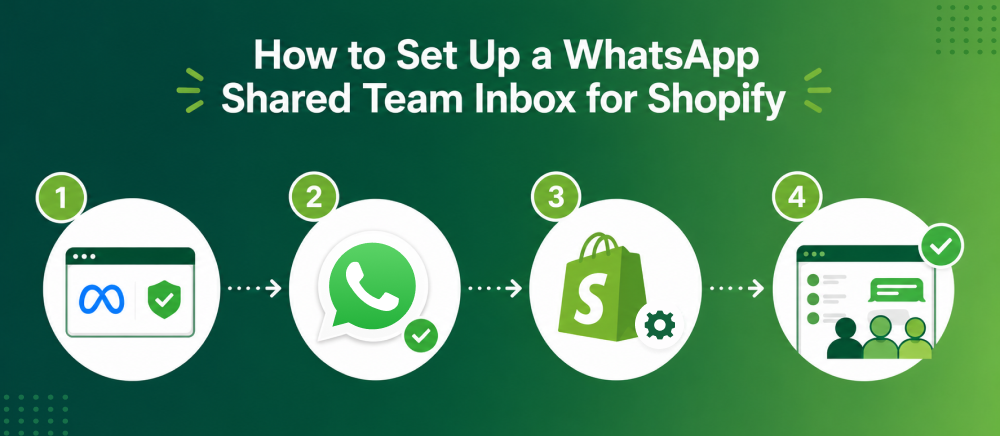
Three things need to be in place before any setup begins:
- A verified Meta Business Manager account connected to your business
- A dedicated WhatsApp Business number — not a personal number and not one currently registered on a personal WhatsApp account. This becomes your permanent customer-facing support number
- A WhatsApp app installed on Shopify that connects the WhatsApp Business API to your store
The API is a non-negotiable requirement. The WhatsApp Business App — even with its multi-device feature — does not support conversation assignment, agent roles, or the Shopify data integration that makes a shared inbox genuinely useful. For the full API setup process, the WhatsApp Business API for Shopify guide covers the complete application and verification flow.
Step 1 — Connect the WhatsApp Business API to Your Shopify Store
Install a WhatsApp app on Shopify that handles the API connection. A Shopify-native app manages the link between your WhatsApp Business number, the API, and your Shopify store data — without requiring custom development or a developer resource.
Once connected, your WhatsApp number functions as a business API number — capable of handling unlimited simultaneous conversations, connecting to a shared inbox, and triggering automations based on Shopify events.
Step 2 — Add Agents and Define Roles
Add each team member to the shared inbox platform with their own login. Assign a role to each agent before they start handling conversations:
- L1 Support — handles standard queries: WISMO, order status, return requests, COD confirmation
- L2 Support — handles escalations: unresolved complaints, refund disputes, delivery exceptions
- Supervisor — monitors open backlog, queue depth, response times, and agent workload. Can reassign conversations. Does not handle L1 queries directly
Define these roles before launch. Agents who don’t know what they own will default to handling everything that comes in — which recreates the single-agent problem in a more expensive setup.
Step 3 — Set Up Conversation Assignment Rules
Assignment rules determine how new conversations get distributed to agents. Two approaches work for most Shopify stores:
Round-robin assignment automatically distributes each new conversation to the next available agent in rotation. It’s fair, simple to configure, and effective when agents handle the same query types. Most Shopify stores start here.
Skill-based routing assigns conversations based on query type — a WISMO query goes to the agent who handles order queries, a return request goes to the agent handling returns. More effective once query volume is high enough to justify specialisation. Usually introduced after the first 4–6 weeks of data on what query types are arriving.
Step 4 — Configure Escalation Protocols
An escalation protocol defines what happens when an L1 agent can’t resolve a conversation. Without one, agents either keep the conversation open indefinitely or close it without resolution — both of which create re-contact.
A basic escalation protocol for a Shopify support team:
- L1 agent can’t resolve within one reply → reassign to L2 with an internal note explaining the issue and what was already tried
- L2 agent can’t resolve within the same session → notify supervisor with the conversation context
- Complaint involving a delivery partner or fulfilment error → escalate immediately to supervisor, do not leave with L1
Set these rules before going live. The worst time to design an escalation protocol is mid-conversation when something has already gone wrong.
Step 5 — Set Response Time Targets Per Agent
Set a first response time target for each agent role before the inbox goes live. For most Shopify stores:
- L1 agents: first response within 5 minutes during business hours
- L2 agents: first response within 15 minutes when escalated
- Supervisor: acknowledge escalated tickets within 30 minutes
For how to communicate the response window to customers automatically — so they know what to expect before the agent replies — the WhatsApp auto reply message guide covers greeting and away message setup.
WhatsApp Shared Inbox Best Practices for Shopify Teams
A well-managed WhatsApp shared inbox improves team productivity and customer satisfaction. By assigning chats, setting response guidelines, and using automation, Shopify support teams can handle conversations more efficiently.
Round Robin vs Skill-Based Routing for WhatsApp Support
Start with round-robin. It’s simple to configure, requires no classification of incoming queries, and distributes load fairly across agents. Run it for the first 4–6 weeks.
After that period, review your most common query types against which agents resolved them fastest and most accurately. If one agent consistently resolves return requests faster than others, skill-based routing for return queries to that agent produces measurably better resolution times. If query types are roughly even and agent capabilities are comparable, round-robin continues to work.
The mistake most Shopify teams make is configuring skill-based routing before they have data — building complex assignment rules based on assumptions about which agents are best at what, before any real volume has shown them.
How to Handle WhatsApp Support Escalations
When an L1 agent escalates a conversation to L2 or a supervisor, the customer should never know the handoff happened — and they should never have to repeat their situation to the new agent.
Two things make that possible: internal notes and conversation history.
Internal notes are messages within the conversation that only agents can see. When an L1 agent reassigns a conversation, they leave a note: “Customer ordered COD on [date], says order hasn’t arrived. Carrier says delivered. Customer disputes this — photos attached. Needs replacement or refund decision.” The L2 agent picks up with full context and replies directly, without asking the customer to explain again.
Preventing Double Replies in a WhatsApp Shared Inbox
This is the most common shared inbox failure in the first weeks of operation — and it’s the one that damages customer trust most visibly. A customer receives two different WhatsApp replies from two different agents who both picked up the same conversation before assignment rules were enforced.
The prevention is structural: no agent should be able to reply to a conversation that’s assigned to someone else. Most shared inbox platforms enforce this at the UI level — once a conversation is assigned, other agents can view it but can’t reply without unassigning it first.
The recovery, when it does happen: acknowledge it directly. “Apologies — you heard from two of us at once. [Agent name] will be handling your query from here.” Don’t pretend it didn’t happen. Customers notice, and a direct acknowledgement recovers more trust than hoping they didn’t.
For the full set of day-to-day operational practices that make WhatsApp support run well alongside a shared inbox, the WhatsApp customer support tips guide covers team management and the human-vs-automation balance in detail.
What Shopify Agents Should See in the WhatsApp Shared Inbox
A WhatsApp shared inbox gives Shopify support agents instant access to the customer information they need to resolve queries quickly. The right inbox should display key order details, conversation history, and team context in one place.
Shopify Order Data Every Support Agent Needs in Chat
Before evaluating any shared inbox platform for your Shopify store, confirm exactly what Shopify data appears inside the conversation view. The minimum that should be visible without opening a separate tab:
- Customer name and contact number
- Last 3 orders — order number, date, items, value
- Current order status — confirmed, processing, dispatched, delivered, returned
- Tracking number and carrier name for dispatched orders
- Payment method — particularly relevant for COD orders
- Previous support interactions on the same number
A platform that requires the agent to open Shopify to find any of this information is adding friction at the exact moment the agent is trying to respond quickly. Every second spent switching tabs is a second of response time added to every conversation.
Chatix is built specifically for Shopify — the shared inbox pulls order data, tracking status, and customer history from Shopify automatically, so agents have the full picture without switching tools.
Customer Conversation History in the Shared Inbox
A returning customer who contacted support three weeks ago about a sizing issue shouldn’t have to explain that context again when they message about a delivery question. A well-configured shared inbox surfaces the previous conversation thread automatically when the same customer contacts the store again.
This matters most for customer trust. A customer who is recognised — whose history is acknowledged, even implicitly through an agent who already knows their situation — feels like a customer the brand knows. A customer who has to re-explain from scratch every time they contact support feels like a ticket number.
Final Thoughts
A WhatsApp shared team inbox solves the problems that a single-account setup creates as Shopify support volume grows — missed conversations, double-handling, slow response times, and agents with no visibility into each other’s work. None of those problems announce themselves clearly until they’re already costing customers.
The setup is one afternoon. The protocols — assignment rules, escalation paths, agent roles — take another. The change in support quality, measurable in first response time and resolution rate, shows up within the first week.
The time to do it is before you need it, not after the first customer writes a review about an unanswered message.
Chatix connects the WhatsApp Business API directly to your Shopify store — giving your team a shared inbox with Shopify order context visible in every conversation, conversation assignment and escalation built in, and the ability to scale from one agent to a full support team without changing your WhatsApp number.
Frequently Asked Questions
1. How many agents can use a WhatsApp shared inbox?
There’s no fixed limit from Meta — agent count depends on your shared inbox platform and plan. Most Shopify-focused plans start from 2–3 agents and scale from there.
2. Do I need the WhatsApp Business API for a shared team inbox?
Yes. The WhatsApp Business App’s multi-device feature allows shared access but not conversation assignment, agent roles, or Shopify integration. A proper shared inbox requires the API.
3. How does a WhatsApp shared team inbox show Shopify order data?
Through a native Shopify integration in the inbox platform — the app pulls order status, fulfilment details, and customer history from Shopify and displays them in a sidebar next to each conversation.
4. What is the difference between a WhatsApp shared inbox and WhatsApp Web?
WhatsApp Web mirrors one WhatsApp account on a browser — one agent at a time, no assignment, no team structure. A shared inbox is a separate platform where multiple agents work simultaneously with conversation assignment, escalation rules, and Shopify data.
5. When should a Shopify store switch from WhatsApp Business App to a shared inbox?
When you have more than one agent handling customer conversations, or when your daily conversation volume reaches 20–30. Whichever comes first.