


7 WhatsApp Customer Support Tips to Improve Response Time and Customer Satisfaction
Customer Support Published: August 07, 2025
Running WhatsApp customer support for a Shopify store is quick to set up. Running it well — consistently, at speed, with the kind of quality that brings customers back — takes a different set of habits.
These 7 tips cover the operational layer: specific actions to improve response time, reduce conversation backlogs, and make every support interaction count. For the full strategic foundation — App vs API, WISMO handling, COD verification, and the automation framework — the WhatsApp customer support guide for Shopify covers everything these tips build on.
Quick Answer
The fastest way to improve WhatsApp customer support on Shopify is to do three things: set a specific response time target and communicate it in your greeting message, build a quick reply library for your 10 most common queries, and use labels to triage every conversation the moment it opens. These three changes alone reduce average response time and improve resolution consistency — without changing your team size or tools.
Key Takeaways
- A stated reply window reduces customer follow-up messages — customers stop re-sending when they know when to expect a response
- Quick replies save the most time on the queries that come in most often — WISMO, return policy, sizing, COD — not on unusual ones
- Labels are a triage tool, not a filing system — apply them the moment a conversation opens, not after it closes
- Industry data shows WhatsApp feedback requests consistently outperform email CSAT surveys by a wide margin — the channel matters as much as the ask
- The right time to set up a shared team inbox is before you need it, not when you’re already overwhelmed
Tip 1 — Set Your Reply Window and Tell Customers Upfront
The most effective way to reduce customer anxiety while they wait for a reply is to tell them exactly how long the wait will be — before they start waiting.
Most Shopify stores run WhatsApp support as if customers know the reply window already. They don’t. A customer who messages and hears nothing for 45 minutes doesn’t know if a reply is coming in 5 minutes or 5 hours. That uncertainty generates re-sends, frustration, and in some cases a 1-star review before the original message has even been read.
The fix is specific and immediate. In your greeting message, state the window: “Hi! We reply within 2 hours on weekdays, 9 AM to 6 PM.” In your away message, state when you’re back: “We’re closed right now — we’ll reply first thing tomorrow morning.” Set your internal agent target to match that window so you know when you’re falling behind it.
For setting up greeting and away messages that communicate your reply window to every customer automatically, the WhatsApp auto reply message guide covers the full setup.
A rough guide to reply window targets by volume:
- Under 20 conversations per day — 2-hour target during business hours
- 20–50 conversations per day — 1-hour target with automated triage
- 50+ conversations per day — 30-minute first response with a shared inbox
The target you can’t hit is worse than no target at all — it makes every late reply look like a broken promise. Set a window you can actually meet, then tighten it as your team grows.
Tip 2 — Build a Quick Reply Library for Your 10 Most Common Shopify Queries
A quick reply is a saved response you trigger with a short keyword and send instantly. WhatsApp Business supports up to 50. Most Shopify stores use fewer than 5 — which means 45 potential time-savings sitting unused.
The queries that drain the most agent time are almost always the same 10: Where is my order? How do I return this? What is your return policy? Do you deliver to my location? Can I change my address? Do you have this in a different size? What is the COD process? How long does delivery take? Can I cancel my order? Is this item in stock?
Each of those has a template answer that is 80% the same every time. A quick reply means the agent types two characters, selects the reply, adjusts the order-specific detail, and sends. A query that took two minutes to type now takes 15 seconds.
Shopify-specific quick replies to build first:
- /wismo — “Your order is with [courier]. Here’s the tracking link: [link]. Expected delivery: [date].”
- /return — “You can return within [X] days of delivery. Reply with your order number and we’ll send you the return label.”
- /cancel — “We can cancel before dispatch. What’s your order number?”
- /cod — “COD is available. We’ll send a confirmation before dispatch — just reply to confirm when you get it.”
- /stock — “Let me check that for you — which size and colour are you looking for?”
For a broader set of pre-written templates across cart recovery, order updates, COD verification, and promotional campaigns — the WhatsApp message templates library has ready-to-use options you can adapt directly into your quick reply setup. Build these before going live with WhatsApp support. Update them whenever your policy changes — a quick reply with the wrong return window is worse than no quick reply at all.
Tip 3 — Use Labels to Triage Every Conversation Before You Reply
Labels are WhatsApp Business’s built-in conversation tagging system. Most stores use them to file conversations after they close. The operational value is in applying them the moment a conversation opens — before the first reply.
When a new message comes in, a five-second label application tells every agent what the conversation is, who owns it, and what stage it’s at — without needing to read the full thread. It also lets you filter open conversations by type and see immediately where backlogs are building.
A Shopify-specific label set to start with:
- New Inquiry — every fresh conversation before it has been assessed
- Order Query — WISMO, tracking, delivery timeline
- Return or Refund — return requests and refund disputes
- Pre-Purchase — product questions, sizing, availability
- COD Verification — needs confirmation before dispatch
- Escalation — unresolved after one reply, needs senior agent or call
- Resolved — closed successfully, awaiting feedback
The discipline is applying labels immediately — not at the end of a shift. A conversation without a label at the start is a conversation that can be missed, double-handled, or lost under message volume.
For a full overview of the Labels feature and how it works alongside other WhatsApp Business tools, the top WhatsApp Business features guide covers the complete set.
Tip 4 — Match Your Message Tone to the Query Type
The same WhatsApp message lands completely differently depending on whether the customer is anxious, frustrated, or undecided. Most support agents apply one consistent tone to every conversation — usually either formally polite or casually friendly — without adjusting based on what the customer is actually feeling when they message.
Three tones for three query types:
Order and delivery queries — speed and specificity first.
A customer asking where their order is wants information, not pleasantries. Get to the answer in the first sentence. Warmth can follow the information, not precede it.
Complaints and returns — empathy before process.
A customer with a damaged product or the wrong item is frustrated. Acknowledge before solving. Jumping to a process before acknowledging the problem makes it worse, not faster.
Pre-purchase product questions — helpful and sales-aware.
A customer asking which product is right for them is a buyer who hasn’t decided yet. Ask the follow-up question that moves them toward the right product. These conversations convert at high rates when handled correctly and drop entirely when handled with a generic FAQ reply.
Agents who understand these three modes handle escalations better, close pre-purchase conversations at higher rates, and generate fewer re-contacts on resolved queries.
Tip 5 — Collect Structured Feedback After Every Support Interaction
Feedback collected on WhatsApp consistently outperforms email CSAT surveys by a wide margin, based on industry data — the customer is already in the conversation, and a one-tap rating costs them almost nothing. Email surveys require the customer to open a separate email, click a link, and load a form. Most don’t.
The feedback request should come after the customer has confirmed their issue is resolved — not during the resolution:
For post-delivery follow-up:
Track responses weekly, not monthly. A drop in 3-ratings during a specific week usually points to a specific agent, a specific query type, or a specific operational period — a new team member, peak season, a policy change. Monthly tracking hides patterns that weekly tracking catches early.
For more variations — post-delivery check-ins, review requests, and NPS-style ratings — the WhatsApp feedback message templates guide has a full set of ready-to-use options.
Tip 6 — Keep Your WhatsApp Business Profile and Hours Accurate
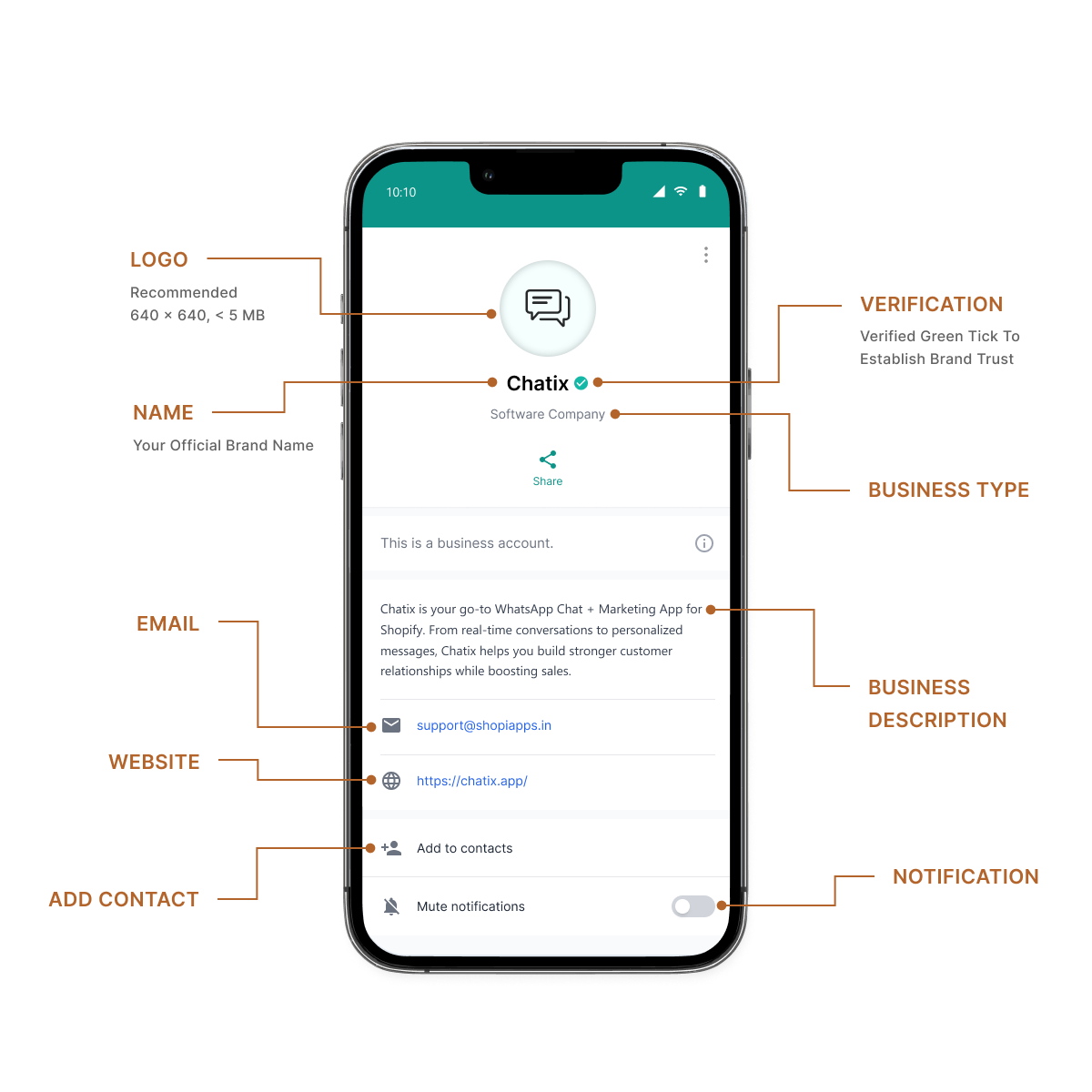
A WhatsApp Business profile does quiet work before a customer sends their first message. Business name, description, hours, website, and catalogue are all visible before the conversation starts. Outdated information in any field creates unnecessary friction — and sometimes generates support queries about things that should have been self-evident from the profile.
Four things to check quarterly:
- Business hours — if your hours have changed but your WhatsApp profile still shows old ones, customers will message outside the window and expect a reply that won’t arrive
- Business description — if your product range or delivery coverage has changed, update the description before customers discover it mid-conversation
- Website link — confirm it points to the right page, especially after a Shopify URL change or domain update
- Product catalogue — remove out-of-stock and discontinued products before customers ask about them in chat
For writing a clear, accurate business description that sets the right expectation before the first message, the WhatsApp business greeting message guide covers both the setup and what to write.
Tip 7 — Graduate to a Shared Team Inbox Before You Need One
The most common WhatsApp support problem for growing Shopify stores isn’t a tool problem — it’s a timing problem. Most stores add a shared team inbox only after they’re already overwhelmed: conversations are being missed, agents are working from personal phones, and response times have started slipping past every target.
By then, setting up and transitioning to a shared inbox costs more time than setting it up at the right moment would have. The right moment is when your support volume feels busy but manageable — around 20–30 conversations per day. Not when it feels impossible.
A shared team inbox means:
- Multiple agents on the same WhatsApp number simultaneously — not one person taking turns on a phone
- Every conversation visible to the whole team — so nothing gets missed when one agent is unavailable
- Clear ownership — each conversation has one assigned agent, not four people reading the same thread
- Shopify order data visible inside the conversation — agents see order status, history, and fulfilment details before they type the first word
Chatix connects the WhatsApp Business API directly to your Shopify store, giving your support team a shared inbox with Shopify order context visible in every conversation. For how the shared inbox connects to broader customer data and conversation history, the WhatsApp CRM guide covers the full integration.
The cost of setting up a shared inbox before you need it: a few hours of configuration and team onboarding. The cost of setting it up after you’re overwhelmed: weeks of degraded response times, missed conversations, and a team managing a transition mid-peak.
How to Know If Your WhatsApp Customer Support Is Working
Four numbers to track weekly — not monthly, because patterns appear in days, not in aggregated monthly averages:
- First response time — target under 5 minutes during business hours. The single most predictive metric for customer satisfaction on WhatsApp.
- Resolution rate — percentage of conversations closed without escalation or re-contact within 48 hours. Below 80% means quick replies or agent responses aren’t solving the actual problem.
- WISMO query volume — should drop measurably once proactive shipping notifications are running. If it hasn’t, the automation isn’t triggering correctly.
- Repeat purchase rate for supported customers — the most important metric for connecting support to business outcomes. Supported customers should repurchase at or above your store baseline.
For the full breakdown of how to measure each metric and what to do when one drops, the WhatsApp customer support guide for Shopify covers the complete measurement framework.
Final Thoughts
WhatsApp customer support quality comes down to habits more than tools. A store with the right setup but no quick reply library, no stated reply window, and no feedback loop will consistently underperform a store with a simpler setup and cleaner operational habits.
Implement one tip at a time rather than all at once — measure its impact on first response time or resolution rate, then add the next. First response time is the right place to start because it improves fastest and its impact on every other metric is immediate.
For Shopify stores ready to move beyond operational tips to full API automation — shared inbox, Shopify order data in conversations, and automated flows for WISMO and COD — Chatix connects everything from one dashboard without custom development.
Frequently Asked Questions
1. What is a good response time for WhatsApp customer support?
Under 5 minutes during business hours is best practice. Above 2 hours, customer satisfaction drops regardless of how well the issue is eventually resolved.
2. How do I collect customer feedback via WhatsApp?
Send a simple rating message at the close of a resolved conversation — “Reply 1 (not happy), 2 (okay), or 3 (really happy).” WhatsApp feedback requests consistently outperform email CSAT surveys because the customer is already in the conversation.
3. How many quick replies should I set up for my Shopify store?
Start with your 10 most common queries — WISMO, returns, cancellations, COD confirmation, sizing. Add more as new patterns emerge and update them whenever your policies change.
4. Should I use WhatsApp Business App or API for customer support?
The App works for one agent at low volume. The API is required for multiple agents, Shopify data inside conversations, or more than 20–30 conversations per day. The full comparison is in the WhatsApp customer support guide for Shopify.
5. How do I improve customer satisfaction on WhatsApp?
Set a reply window and communicate it upfront, match your tone to the query type, and send a feedback request at the close of every resolved conversation. These three changes improve satisfaction scores faster than any tool upgrade.