


6 Ways Shopify Stores Turn WhatsApp Chats Into Real Sales
How-to Guides Published: May 02, 2024
If you use WhatsApp every day, you're already part of a massive community. But most “how to make money on WhatsApp” guides are written for someone with no business yet — join a task app, share affiliate links, start a paid newsletter. None of that applies if you're already running a Shopify store.
Your customers are already messaging you, abandoning carts, and asking the same five questions on repeat. The money isn't in finding a new hustle — it's in the conversations you're already having and not converting. WhatsApp gives Shopify stores a direct line to buyers who read nearly every message sent to them, but reading a message and making a purchase are two different things, and most stores never close that gap.
This guide breaks down the specific, automatable ways a Shopify store actually turns WhatsApp into revenue — not the community-building or link-sharing tactics borrowed from personal side hustles. It's for merchants who already have a store and want WhatsApp pulling its weight as a sales channel, not one more inbox to manage by hand.
Quick Answer
Shopify stores make money from WhatsApp mainly through cart recovery, catalog-linked product chats, and segmented broadcasts — the automated versions of these convert measurably better than doing them one chat at a time.
Key Takeaways:
- Cart recovery and repeat orders drive more WhatsApp revenue for stores than any one-off sales tactic.
- WhatsApp read rates are estimated at 90-98%, far above email — but sending manually caps how many customers you can actually reach in time.
- A product link that opens straight into a WhatsApp chat converts faster than a standard “Add to Cart” button alone.
- Segmented broadcasts, not group messages, are what separate a real sales channel from spam.
- Shopify-specific: it's your store's own order and cart data that makes a WhatsApp message feel relevant instead of generic — most manual setups skip this entirely.
Why Shopify Stores Are Different From Everyone Else Making Money on WhatsApp
Every generic “make money on WhatsApp” list assumes the same starting point: no product, no customers, no store — just a phone number and some hustle. Affiliate links, paid communities, link-shortening schemes — all of it is built for someone starting from zero.
A Shopify store starts somewhere completely different. You already have customers who've bought before, carts that got abandoned mid-checkout, and product pages people visit but don't convert on. The actual money-making question isn't “how do I get people onto WhatsApp” — it's “how do I use WhatsApp to close the gap between browsing and buying that's already happening.”
That reframes almost everything. The tactics below use data your store already has — not audience-building tactics borrowed from creators and side-hustlers.
6 Shopify-Specific Ways to Turn WhatsApp Into Revenue
1. Recover Abandoned Carts Before the Sale Is Gone
A cart abandonment reminder is the single highest-leverage WhatsApp message a Shopify store can send, because the customer already decided to buy — something just interrupted them. Send a reminder within the first hour, and you're catching genuine purchase intent while it's still warm.
The limitation worth naming: timing matters more than message quality here. A perfectly written reminder sent six hours late converts far worse than a plain one sent within 15-30 minutes — which is exactly the window most merchants can't hit by checking carts manually. Cart recovery message templates can help, but the win is in the timing, not the wording.
2. Turn Product Questions Into Closed Sales, Not Just Replies
Every “is this true to size?” or “do you ship to X?” message is a customer close to buying, not a support ticket. Fast, specific replies on WhatsApp move that conversation to a purchase far more often than the same question sitting unanswered in an email queue.
The failure mode here is treating every question the same way a generic FAQ page would — customers ask WhatsApp questions specifically because they want a real answer to their real situation, not a copy-pasted policy line.
3. Link Products Directly Into a WhatsApp Chat
Click-to-WhatsApp links on product pages, Instagram posts, and ads skip the extra step of a customer digging through your site to find what they saw. The link opens straight into a chat about that specific product, already primed to buy.
This works because it shortens the path from “interested” to “talking to someone who can close the sale” — but it only pays off if someone (or something) actually responds fast. A click-to-WhatsApp ad that leads to a chat left unanswered for hours is worse than no chat option at all. For how to set up product-linked WhatsApp selling — catalog configuration, click-to-chat links on product pages, and what to say when the conversation starts — the how to sell products on WhatsApp guide covers the full setup.
4. Send Segmented Broadcasts, Not Mass Blasts
WhatsApp Broadcasts land in a customer's private chat, not a group — which is exactly why they read differently than email. Estimated open rates for WhatsApp messages run in the 90-98% range, well above email, though that figure is an industry estimate rather than a number Meta itself publishes.
Most WhatsApp marketing advice obsesses over copywriting — the perfect opening line, the right emoji. That's largely wasted effort next to segmentation: a plain, mediocre message sent to the right 200 customers will outperform a beautifully written one blasted to 5,000 who never bought from you before. Segment by purchase history first; polish the wording second. For the step-by-step on setting up and sending segmented WhatsApp broadcasts — including contact list setup, template approval, and how to track results — the how to send a broadcast message on WhatsApp guide covers it in full.
The real skill isn't sending broadcasts — it's segmenting them. A flash sale broadcast sent to your entire list the same way you'd send it to your repeat-buyer segment is how stores burn trust and get blocked. Segment by purchase history, and the same channel performs completely differently.
5. Automate the WhatsApp Business API Instead of the App
The free WhatsApp Business App works for a handful of daily conversations. It breaks down past that point — one agent, no automation, no order-flow triggers. The WhatsApp Business API is the paid infrastructure that removes those limits, and tools like Chatix connect it directly to your Shopify order and cart data so messages trigger automatically instead of someone checking manually.
For what the API enables, how to get set up without a developer, and what it costs — the WhatsApp Business API for Shopify guide covers the full decision.
6. Bring Customers Back With Retention Messages
A customer who already bought once is far cheaper to sell to again than a new visitor. Back-in-stock alerts, personalized reorder reminders, and post-purchase check-ins on WhatsApp bring repeat customers back without running a single ad. Retention marketing built around WhatsApp works because the message shows up in the same inbox as a text from a friend, not a promotional folder.
A Real Example: Cart Recovery on WhatsApp
Picture a small skincare Shopify store averaging 40 abandoned carts a week. Switching abandoned-cart reminders from email-only to a WhatsApp message sent within 30 minutes could realistically recover several of those carts a week that would otherwise be lost — the exact number depends entirely on the store's traffic and product price point, which is exactly why this needs real numbers before it goes live, not estimated ones.
What Chatix Adds When You're Ready to Automate This
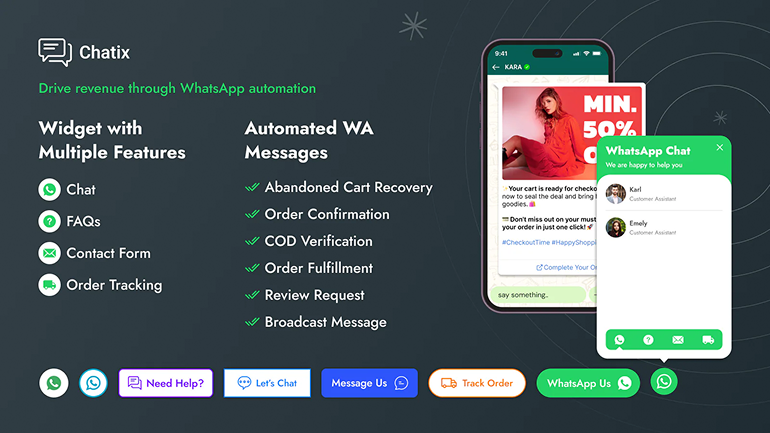
Everything above works manually, at a small enough scale. The moment cart recovery, product chats, and broadcasts need to run without someone at the keyboard, that's where the WhatsApp Business API — and a tool built around it — starts to matter. Chatix connects Shopify's order and cart data directly to WhatsApp, so recovery messages, order updates, and broadcasts trigger automatically instead of depending on someone checking a dashboard in time. It also handles order-status messaging and product-linked selling through the same widget, rather than stitching several tools together.
Final Thoughts
The gap between reading a WhatsApp message and buying through one isn't closed by more content ideas — it's closed by using the cart, order, and product data your Shopify store already has. Cart recovery, product chats, and segmented broadcasts aren't new tactics, but running them off real store data instead of guesswork is what actually moves revenue.
Shopify stores that treat WhatsApp as a manual inbox will always cap out at whatever one person can answer in a day. Chatix automates that layer — cart recovery, order updates, and broadcasts triggered by your store's own data — for merchants ready to stop checking WhatsApp by hand.
Frequently Asked Questions
How can a Shopify store make money on WhatsApp for free?
You don't need the paid WhatsApp Business API to start — the free WhatsApp Business App already supports a product catalog, quick replies, and click-to-chat links. It's manual and doesn't scale past a handful of daily conversations, but it's enough to test whether cart-recovery messages and product chats convert for your store before investing in automation.
How is monetizing WhatsApp different for a Shopify store versus an individual?
An individual monetizing WhatsApp is usually building an audience from nothing — affiliate links, paid communities, content sharing. A Shopify store already has customers, order history, and abandoned carts, so the money comes from converting existing intent faster, not from attracting a new audience.
Do I need the WhatsApp Business API to make money on WhatsApp?
No, but it changes what's possible. These free app works for low message volume handled manually; the API is what enables automated cart-recovery triggers, order-status messages, and broadcast segmentation at scale. Most stores start on the free app and move to the API once manual replies can't keep up.
Is it legal to send promotional messages on WhatsApp?
Yes, as long as the customer opted in and you follow WhatsApp's Business Messaging Policy. Sending unsolicited promotional messages to people who never messaged your store first is a policy violation that can get a business number banned, not just a compliance formality.
What tools help automate WhatsApp revenue for Shopify stores?
Tools built specifically for Shopify's order and cart data — rather than generic WhatsApp broadcast tools — are what make automation actually relevant to a store. The difference shows up in whether a cart-recovery message reflects the real product and price a customer left behind, or just a generic reminder.