


WhatsApp Automation for Shopify — The 5 Flows Explained
Shopify + WhatsApp Integration Published: January 30, 2025
Most Shopify stores using WhatsApp automation for Shopify are running one flow — usually abandoned cart recovery. That one flow works. But it is recovering a fraction of the revenue that WhatsApp automation can deliver when the full system is running.
WhatsApp automation for Shopify is not a single feature. It is a set of five connected flows, each triggered by a specific customer action inside your store, each solving a specific revenue problem. Stores that have all five running do not just recover more carts — they reduce fake COD orders, confirm more deliveries, generate more reviews, and bring lapsed customers back without a single manual message.
This guide covers all five flows — what triggers each one, what it sends, what revenue problem it solves, and how they connect as a system. It also covers how to set them up on Shopify without technical resources.
Quick Answer
The 5 WhatsApp automation flows every Shopify store should have running: abandoned cart recovery, COD order verification, order confirmation and shipping updates, post-delivery review request, and win-back campaign for lapsed customers. All five require the WhatsApp Business API. Start with abandoned cart recovery — it has the fastest and most measurable revenue impact. Add the remaining flows one at a time. A Shopify WhatsApp automation app handles all five without developer resources.
Key Takeaways
- Most Shopify stores run one WhatsApp automation flow — abandoned cart recovery. The other four flows are left unused, each one representing a specific revenue gap
- All 5 flows require the WhatsApp Business API — the standard WhatsApp Business App cannot trigger messages based on Shopify store events
- Each flow solves a different revenue problem: cart abandonment, fake COD orders, post-purchase anxiety, low review volume, and customer churn
- The 5 flows connect as a system — a customer moves through them based on what they do in your store, not on a fixed schedule
- WhatsApp open rates average 90–98% vs email's 20–30%, and messages are read within 3 minutes on average — automation sent at the right moment reaches customers while they are still in a buying mindset
What WhatsApp Automation Actually Does for a Shopify Store?
WhatsApp automation for Shopify means connecting your store to the WhatsApp Business API so that messages go out automatically based on what customers do — not based on what your team remembers to send. A customer abandons a cart: a message goes out. An order is placed: a confirmation goes out. A delivery is marked complete: a follow-up goes out. No manual intervention on any of them.
The difference between a Shopify store with WhatsApp automation and one without it is not just speed — it is coverage. A team manually sending WhatsApp messages can cover a handful of customers a day. Automation covers every customer, every order, every relevant event, around the clock. The message quality is also consistent — the same well-timed, well-worded message goes to every customer rather than whatever the team manages to send when they are not busy with something else.
Why One WhatsApp Automation Flow Is Not Enough?
Abandoned cart recovery is the first flow most Shopify stores set up — and for good reason. The revenue impact is immediate and measurable. But focusing only on abandoned cart leaves four other revenue gaps completely open.
A customer who confirms a COD order via WhatsApp is significantly less likely to reject the delivery. A customer who receives a shipping update does not need to message your support team asking where their order is. A customer who receives a review request three days after delivery is more likely to leave one than a customer who only receives an email that goes unread. A customer who lapsed six months ago and gets a personalised WhatsApp message is more likely to return than one who only sees a retargeting ad.
Each of the five flows solves a problem the others do not. Running all five is not more complexity — it is the same setup, applied to five different trigger points in the customer journey.
The 5 WhatsApp Automation Flows Every Shopify Store Should Have Running
Flow 1 — Abandoned Cart Recovery
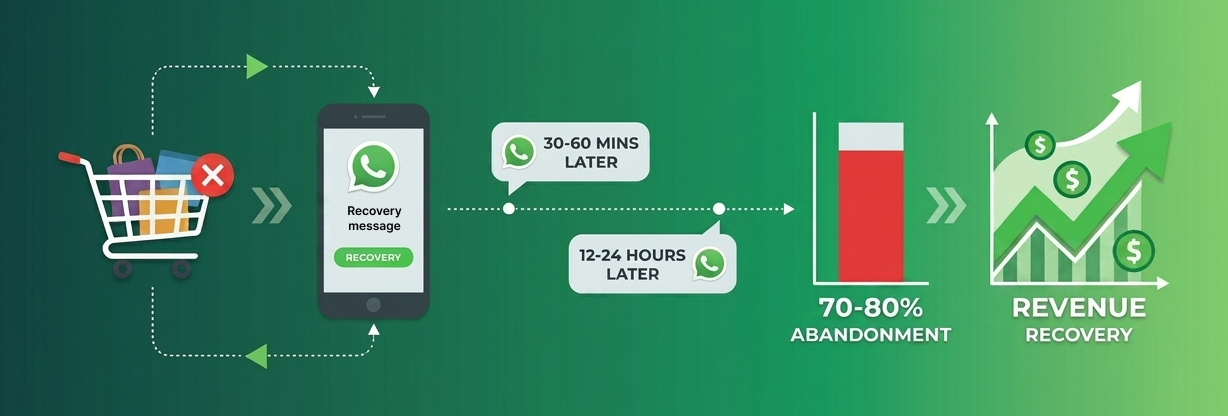
Trigger: A customer adds items to their cart, reaches checkout, and leaves without completing the purchase.
What it sends: A WhatsApp message with the customer's name, the items left in their cart, and a direct link back to the checkout. A well-structured flow sends two messages — the first within 30 to 60 minutes of abandonment while the customer is still warm, and a second 12 to 24 hours later if they have not returned.
Revenue problem it solves: Cart abandonment rates on Shopify stores average 70–80%. Email recovery sequences reach customers hours later, after the buying intent has cooled. WhatsApp reaches them within minutes — and because customers can reply, a recovery message often surfaces the specific objection standing between them and the purchase.
What makes it work: Timing and personalisation. A generic 'You left something behind' message sent 24 hours later underperforms a message sent within an hour that names the product and includes the checkout link. The reply is the advantage WhatsApp has over email — a customer who replies with a question about sizing or delivery is giving you the information you need to close the sale.
The full abandoned cart setup — timing windows, message templates, reply handling, and opt-in configuration — is covered in the WhatsApp abandoned cart recovery for Shopify guide.
Flow 2 — COD Order Verification
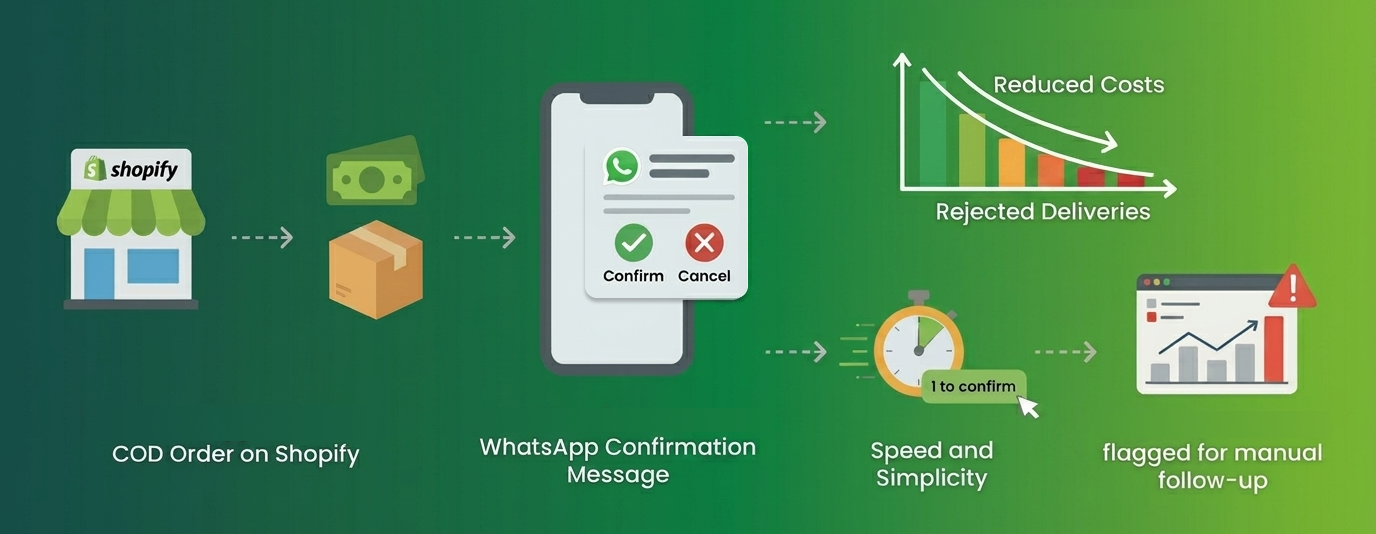
Trigger: A customer places a cash-on-delivery order on your Shopify store.
What it sends: A WhatsApp message asking the customer to confirm their order — typically with a simple reply like 1 to confirm or 2 to cancel. The message includes the order number, items ordered, and delivery address so the customer can verify the details are correct.
Revenue problem it solves: Fake and unverified COD orders create two direct costs — fulfilment cost on orders that never get delivered, and return shipping costs when deliveries are rejected. Shopify stores in markets where COD is the primary payment method consistently report a significant proportion of COD orders being returned or undelivered. A verification message sent immediately after the order is placed reduces this substantially — customers who take the step to confirm are far more committed to receiving the delivery.
What makes it work: Speed and simplicity. The message goes out within minutes of the order being placed, while the customer still has the purchase in mind. The reply mechanism needs to be simple — a single digit response, not a paragraph. Unconfirmed orders after 12–24 hours can be flagged for manual follow-up or automatically cancelled, depending on your store's policy.
How COD verification connects to RTO reduction and the specific message setup for Shopify stores is covered in the WhatsApp COD verification guide.
Flow 3 — Order Confirmation and Shipping Updates
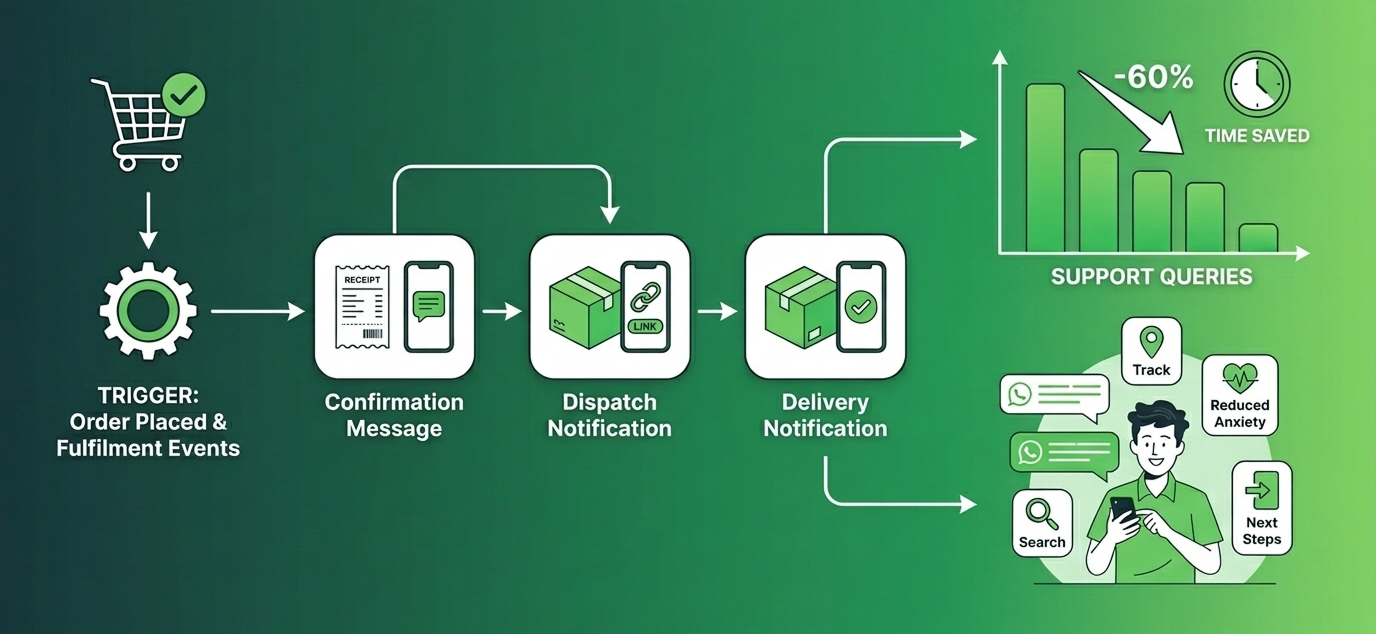
Trigger: An order is placed (order confirmation) and a fulfilment event occurs — order packed, shipped, or out for delivery (shipping updates).
What it sends: A WhatsApp message at each stage of the order journey — confirmation immediately after purchase, dispatch notification when the order ships with a tracking link, and a delivery notification when the order is marked delivered.
Revenue problem it solves: Post-purchase anxiety is the most common driver of support tickets for Shopify stores. 'Where is my order?' is the single most frequent customer support query — and every one of those queries is a manual task for your team. Automated shipping updates eliminate the question before it is asked. A customer who receives a dispatch notification with a tracking link has no reason to contact support. A store doing 100 orders a day and reducing inbound support queries by 60% is saving significant team time every week.
What makes it work: Completeness and timing. A single confirmation message is not enough — customers want updates at each stage. The dispatch message with a working tracking link does the most work. The delivery message opens the door for the next flow — the review request. Ready-to-use WhatsApp shipping message templates for order confirmation, dispatch, and delivery notifications are available in the templates library — approved formats ready to activate.
Flow 4 — Post-Delivery Review Request
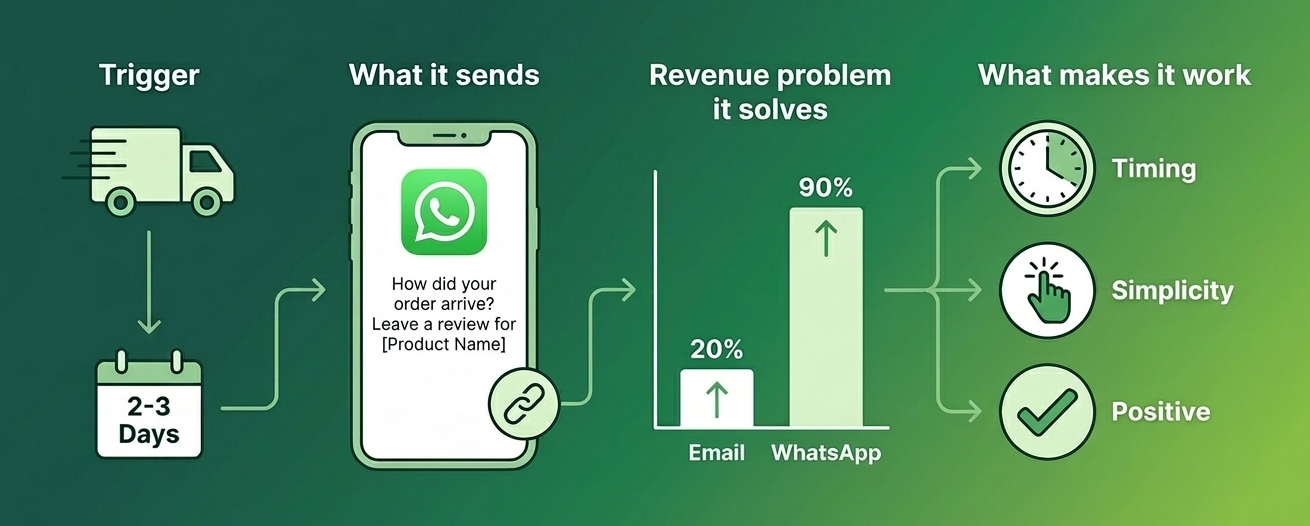
Trigger: An order is marked as delivered in Shopify — typically 2 to 3 days after the delivery notification.
What it sends: A WhatsApp message asking the customer how their order arrived and inviting them to leave a review. The message includes the product name and a direct link to leave a review on your store or preferred review platform.
Revenue problem it solves: Social proof drives conversion on Shopify — stores with more reviews consistently outperform those with fewer. The problem is that most customers who are satisfied with a purchase do not spontaneously leave a review. They need to be asked, at the right moment, through the right channel. An email review request sent three days after delivery gets opened by 20% of recipients. A WhatsApp review request sent at the same time gets read by over 90% of recipients — and the reply rate is substantially higher because the customer is already in a conversational channel.
For a deeper look at how WhatsApp review requests compare to traditional star rating flows on Shopify, the WhatsApp reviews vs star ratings guide covers the difference in response rates and review quality.
What makes it work: Timing and simplicity. Sending the review request too early — before the product has arrived — generates negative responses. Sending it too late — a week after delivery — loses the moment when the customer's experience is freshest. 2 to 3 days after the delivery notification is the optimal window. The review link must be direct — one click to the review form, not to the store homepage.
Flow 5 — Win-Back Campaign for Lapsed Customers
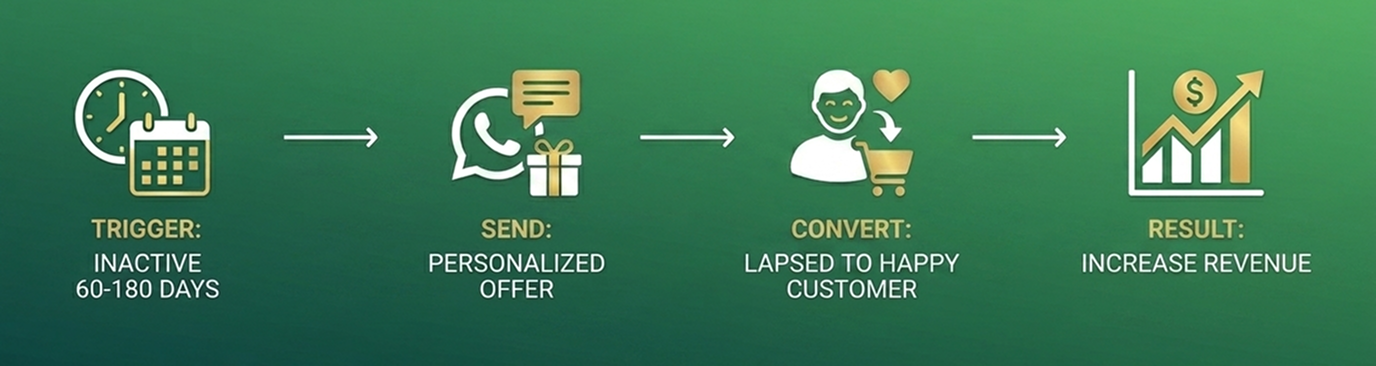
Trigger: A customer has not placed an order in a defined number of days — typically 60 to 90 days for stores with a repeat purchase cycle, or 120 to 180 days for stores with longer natural purchase intervals.
What it sends: A personalised WhatsApp message referencing the customer's last purchase and inviting them back — often with a specific offer, a new product relevant to what they previously bought, or simply a check-in. The message uses the customer's name and purchase history to make it feel relevant rather than promotional.
Revenue problem it solves: Acquiring a new customer costs 5 to 7 times more than retaining an existing one. A customer who has bought from your store once already trusts it — the barrier to a second purchase is lower than the barrier to a first. Most Shopify stores do not have a structured win-back flow, which means lapsed customers quietly drop off without any attempt to bring them back. A WhatsApp win-back message at the right interval reaches customers in a channel where they are far more likely to engage than through an email they have stopped opening.
The WhatsApp offer message templates library has ready-to-use win-back and re-engagement templates — personalised enough to feel relevant, approved for API sending.
What makes it work: Relevance and timing. A generic 'We miss you' message performs poorly. A message that references a specific product category the customer bought from, or that announces a new arrival in that category, performs significantly better. The timing window should match your store's natural repurchase cycle — a skincare store with a 60-day product lifespan should trigger win-back at day 65, not day 120.
How These 5 Flows Work Together as a System?
Each flow solves a different problem. But the reason running all five together outperforms running any single flow is that they move a customer through their entire lifecycle with your store — from the moment they almost bought, through every stage of the order, to bringing them back for the next purchase.
What Triggers Each Flow
| Flows | Trigger Event | Timing | Revenue Impact |
|---|---|---|---|
| Abandoned Cart Recovery | Customer leaves checkout without purchasing | 30–60 min after abandonment | Recovers lost sales |
| COD Verification | Customer places a COD order | Within 5 min of order placement | Reduces fake orders and RTOs |
| Order Confirmation & Shipping | Order placed / order shipped / delivered | Immediately at each stage | Reduces support tickets |
| Review Request | Order marked delivered in Shopify | 2–3 days after delivery | Increases review volume |
| Win-Back Campaign | Customer inactive beyond threshold | 60–90 days post last purchase | Recovers lapsed customers |
How Each Flow Connects to the Next?
A customer who abandons a cart and recovers through Flow 1 immediately enters Flow 3 — they placed an order, so order confirmation and shipping updates go out automatically. If that order is COD, Flow 2 fires before Flow 3. The customer receives their order, Flow 4 asks for a review. If they do not purchase again within the win-back window, Flow 5 reaches out.
A customer who does not recover from the abandoned cart does not enter any of the other flows — but they remain in your contact list. If they return and purchase later, the system picks them up from the right point.
The system is self-managing. No one on your team decides which message goes to which customer — the Shopify store events do that automatically. Your team's job is to reply to customers who respond, not to manage the sending.
How to Set Up WhatsApp Automation on Your Shopify Store?
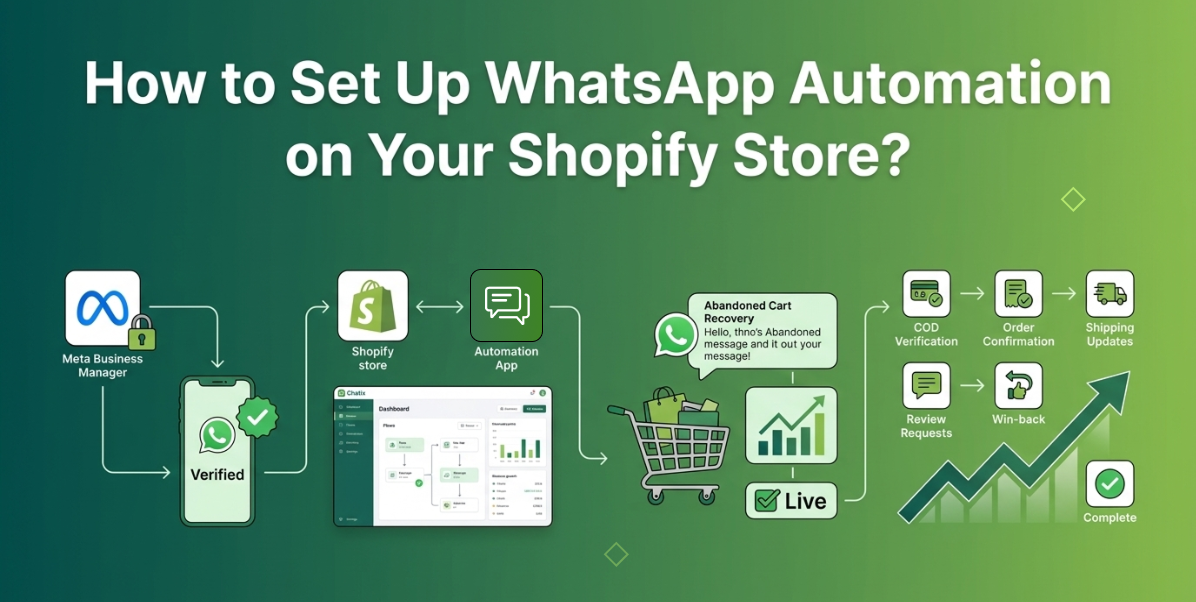
Step 1 — Get WhatsApp Business API Access
All five flows require the WhatsApp Business API — the standard WhatsApp Business App cannot trigger messages based on Shopify store events. The API connects your WhatsApp Business number to external tools that handle the automation.
To access the API you need a verified Meta Business Manager account and a dedicated phone number that is not linked to a personal WhatsApp account. The full process — including what Shopify merchants need before applying and how long verification takes — is covered in the WhatsApp Business API for Shopify guide.
Step 2 — Install a Shopify WhatsApp Automation App
A Shopify WhatsApp automation app connects the API to your store and handles the automation logic — which Shopify events trigger which messages, what the messages say, and when they send. Without an app, setting this up requires custom API development.
The right app does five things without developer resources: connects your WhatsApp Business number to Shopify, activates automation flows from a dashboard, surfaces Shopify order data inside customer conversations, manages opt-in compliance, and tracks flow performance. For a comparison of the apps available for Shopify WhatsApp automation, the best WhatsApp automation tools guide covers the options in detail.
Chatix connects all five automation flows directly to your Shopify store — setup takes under an hour and requires no technical configuration.
Step 3 — Activate Your First Flow
Start with abandoned cart recovery. It has the fastest time to measurable revenue impact and the clearest setup — one trigger, one or two messages, one metric to track (recovery rate).
Before activating, confirm three things: the opt-in checkbox is live on your Shopify checkout so customers consent to receive WhatsApp messages, your message template has been approved by Meta, and the automation is connected to your live Shopify store rather than a test environment. Run a test by adding a product to cart from your own phone number, abandoning checkout, and confirming the message arrives correctly within the trigger window.
Step 4 — Add the Remaining Flows One at a Time
Once abandoned cart recovery is running and the baseline metrics are clear — delivery rate, open rate, recovery rate — activate COD verification if COD is a payment method on your store. Then activate order confirmation and shipping updates. Then review requests. Then win-back.
Adding one flow at a time lets you identify and fix any issues before the next flow is live. A problem with the message template or the trigger timing is easier to diagnose when only one flow changed. Most Shopify stores can have all five flows running within two weeks of activating the first.
Conclusion
WhatsApp automation for Shopify is not complicated to set up — but most stores set up one flow and stop there. The five flows in this guide are not five separate projects. They are one system, activated one step at a time, that covers the customer journey from almost-purchase through to repeat buyer.
The stores recovering the most revenue from WhatsApp are not doing anything technically advanced. They have all five triggers connected, all five message templates approved, and they reply to customers who respond. The automation handles the volume. The team handles the conversations.
Once the five flows are running, the next step is connecting WhatsApp to your broader Shopify marketing setup — broadcast campaigns, segmented promotions, and product launch messaging. The WhatsApp Shopify integration marketing setup guide covers that in full.
Chatix connects all five automation flows directly to your Shopify store — abandoned cart recovery, COD verification, order updates, review requests, and win-back campaigns — from one dashboard, starting from a free plan.
Frequently Asked Questions
1. Does WhatsApp automation work for Shopify stores?
Ans: Yes — specifically through the WhatsApp Business API connected to Shopify. The API triggers messages based on store events like cart abandonment, order placement, and fulfilment updates automatically.
2. Which WhatsApp automation flow should I set up first on Shopify?
Ans: Abandoned cart recovery — it has the fastest and most measurable revenue impact and the most straightforward setup. Add the other four flows once the first is running and tracked.
3. Do I need the WhatsApp Business API for Shopify automation?
Ans: Yes. The standard WhatsApp Business App cannot trigger messages based on Shopify events. All five automation flows in this guide require API access.
4. Can WhatsApp automation get my number banned?
Ans: Only if you use unofficial tools or send to customers who have not opted in. The official WhatsApp Business API with proper opt-in compliance carries no ban risk when used correctly.
5. How many automation flows can a Shopify WhatsApp automation app support?
Ans: A purpose-built Shopify WhatsApp automation app typically supports all five flows — abandoned cart recovery, COD verification, order confirmation and shipping updates, review requests, and win-back campaigns — plus broadcast campaigns and a shared team inbox.